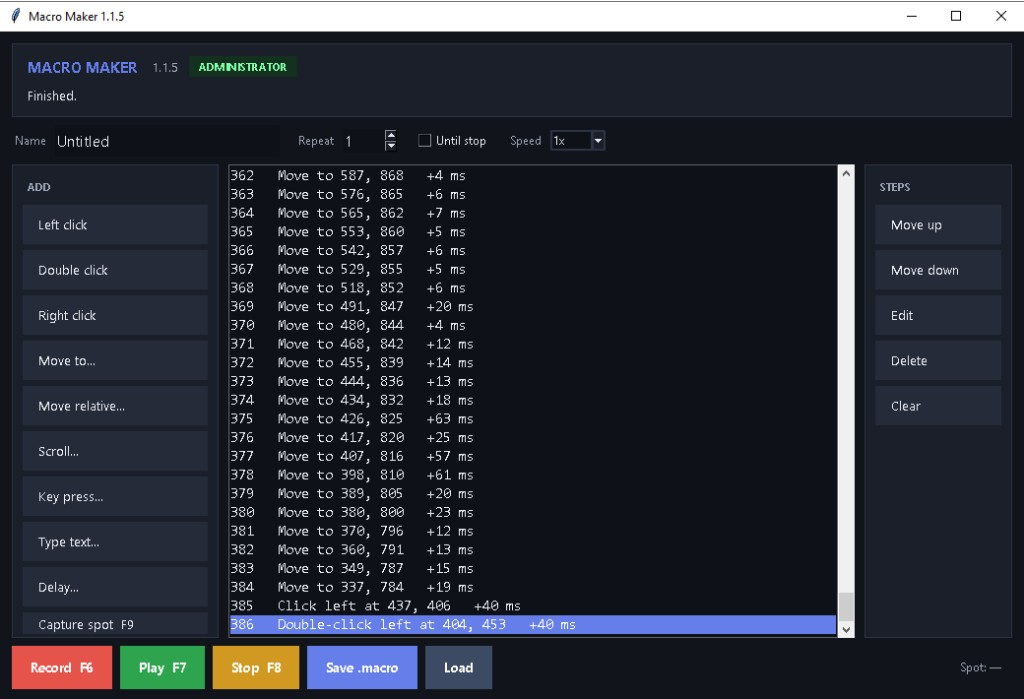
Create and playback custom mouse and keyboard macros with precision control
Download for WindowsVersion 1.1.5 • Free • Windows 10/11 (64-bit) • Title bar must say Macro Maker 1.1.5 • Asks for administrator • No command window
No software certificate. If Windows says it protected your PC, click More info, then Run anyway.
Record your mouse movements and clicks, then play them back automatically. Save macros for reuse.
Create macros by manually adding clicks, movements, and keyboard actions. Full precision control.
Save your macros as .macro files. Load and run them anytime. Build a library of automation sequences.
Capture exact X/Y coordinates with one click. Move to absolute or relative positions with pixel accuracy.
Include keyboard input in your macros. Type text, press special keys, use hotkeys and shortcuts.
Move actions up or down in your sequence. Edit, delete, or insert new actions anywhere.
| Operating System | Windows 10, 11 (64-bit) |
| File Format | .macro files (JSON-based, human-readable) |
| Actions Per Macro | Unlimited (limited only by memory) |
| Timing Precision | Millisecond accuracy for delays |
| Storage | Macros saved in application directory |
| Cost | 100% Free, No Ads, No Tracking |
It records mouse clicks and keystrokes on Windows, then plays that sequence back. You can also type the steps yourself and save them as a .macro file.
F6 records, F7 plays, and F8 or Esc stops. Move the pointer to the top-left corner to stop playback.
The download is not code-signed. Click More info, then Run anyway.
Free • Windows 10/11 (64-bit) • No installation required
No software certificate. If Windows warns you, click More info, then Run anyway.