Free Chrome Transparency Tool for Windows 10 & 11 - Make Chrome Windows Transparent | Chrome Window Transparency Software 2026
Version 1.2.5 • Updated Sep 21, 2026
Make Chrome browser windows transparent so you can see through to other applications. Perfect for watching videos while working on other tasks. This free Windows tool allows you to make Chrome windows transparent with adjustable opacity, and optionally keep Chrome on top so you can see through to applications like Cursor, VS Code, or any other app behind Chrome.
What's new in v1.2.5
- Enable Transparency auto-checks Always on Top, Hide Bookmarks Bar, and Click-Through
- From v1.2.4: Click-safe Select window — no accidental play/pause while choosing windows
- From v1.2.1: Restart as Administrator no longer freezes
- From v1.1: System tray — close minimizes instead of quitting
See It In Action
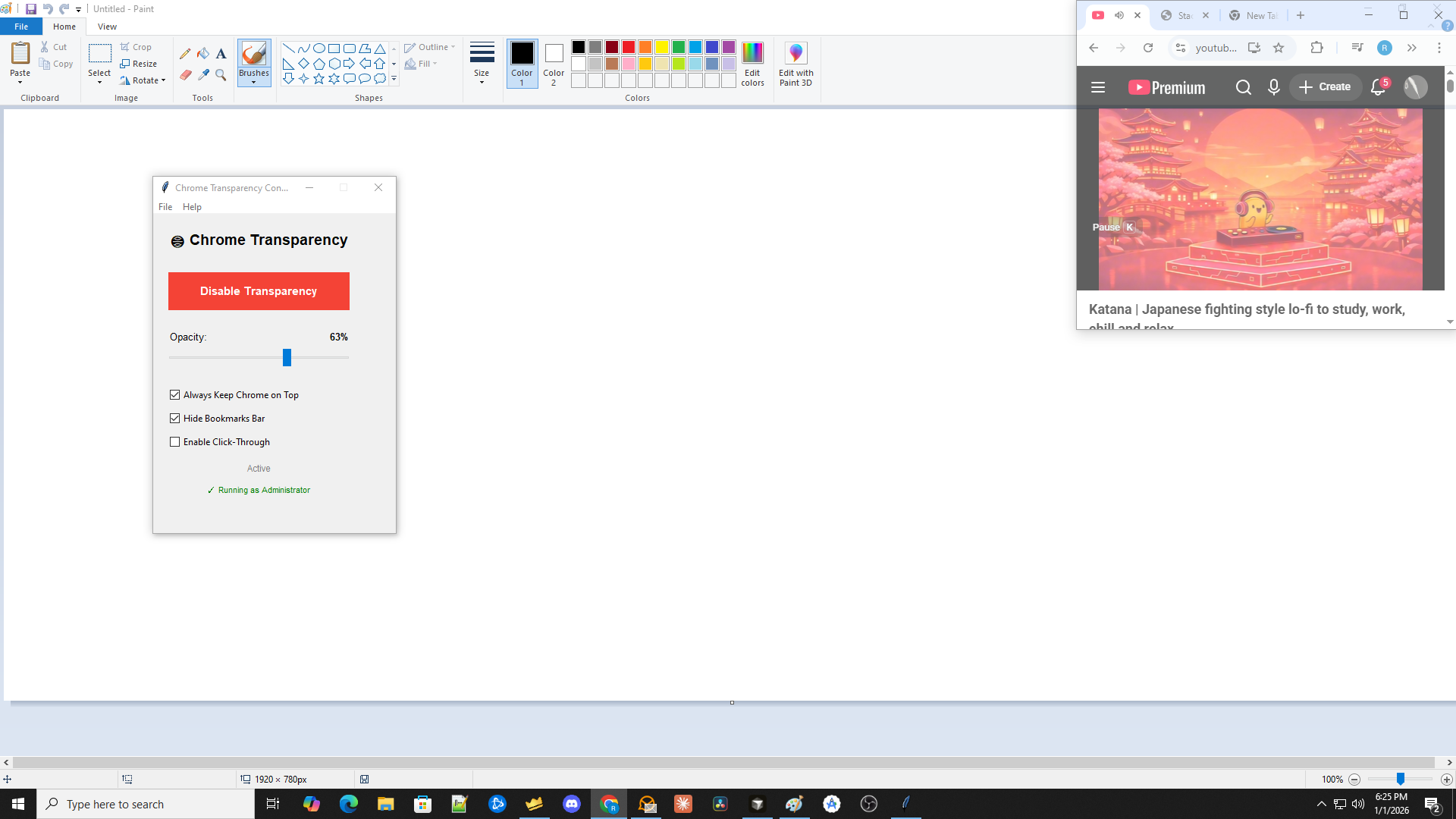
Example: Chrome window with YouTube video made transparent, allowing you to see through to MS Paint and other applications behind it. The Chrome Transparency Controller (shown in the overlay) lets you adjust opacity in real-time while working.
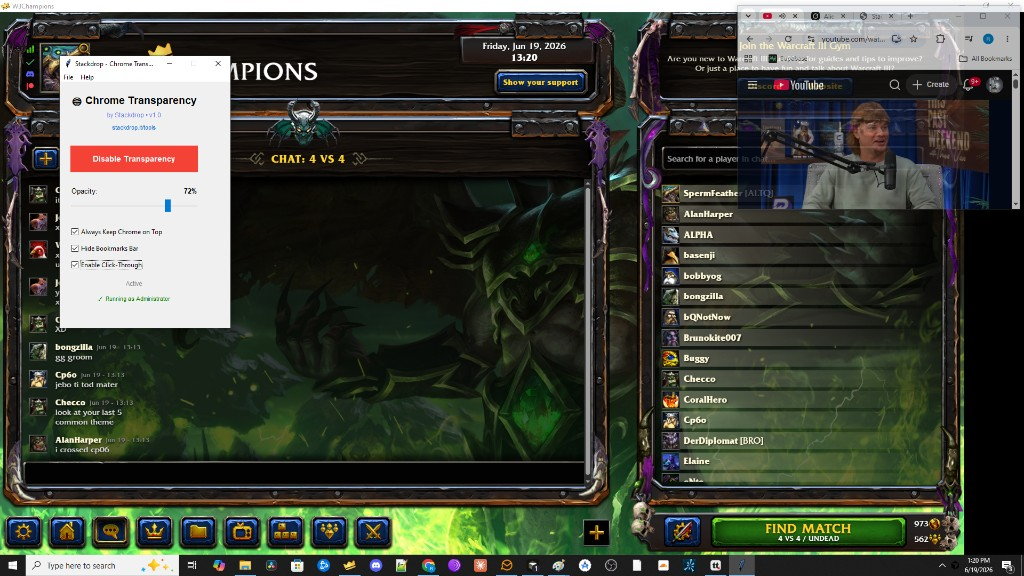
Gaming example: Watch a YouTube video in a transparent Chrome overlay while waiting in a W3Champions lobby. Keep Chrome on top at 72% opacity with click-through enabled so you can still interact with the game behind it.
Click image to expand
What is Chrome Transparency Controller?
Chrome Transparency Controller is a Windows application that allows you to make Chrome browser windows transparent, keep them always on top, and control various Chrome UI elements. This is perfect for watching videos or monitoring content while working on other applications. The tool provides a simple, user-friendly interface with real-time controls for transparency, window positioning, and Chrome UI customization.
How It Works
The application uses Windows API functions to modify Chrome window properties at the operating system level:
- Transparency: Applies alpha transparency to Chrome windows using
SetLayeredWindowAttributes, making them see-through while remaining fully functional - Always on Top: Forces Chrome windows to stay above all other windows using
SetWindowPoswithHWND_TOPMOSTflag - Click-Through: Makes Chrome windows transparent to mouse clicks using
WS_EX_TRANSPARENTextended window style, allowing you to interact with applications behind Chrome - Bookmarks Bar: Toggles Chrome's bookmarks bar visibility using keyboard shortcuts (
Ctrl+Shift+B) and automatically syncs with Chrome's actual state - Select Window (v1.2): Red border on every Chrome window. Click to select or unselect — control 1, 2, 3, or any combination
Features
1. TRANSPARENCY CONTROL
- Adjust opacity from 10% to 90% using an intuitive slider
- Chrome windows become see-through while remaining fully functional
- Perfect for watching videos while working on other tasks
- Real-time opacity adjustment - changes apply instantly
2. ALWAYS KEEP CHROME ON TOP
- Keeps Chrome windows above all other applications
- Useful for monitoring content while using other programs
- Works even when other windows try to come to the foreground
- Maintains transparency while keeping Chrome visible
3. HIDE BOOKMARKS BAR
- Toggles Chrome's bookmarks bar on/off with a simple checkbox
- Uses
Ctrl+Shift+Bkeyboard shortcut automatically - Automatically syncs with Chrome's actual state
- Works independently of transparency settings
4. ENABLE CLICK-THROUGH
- Makes Chrome windows transparent to mouse clicks
- Click through Chrome to interact with applications behind it
- Useful for overlays and screen recording scenarios
- Note: When enabled, you cannot interact with Chrome itself (links, buttons, etc.)
5. SELECT WINDOWS UPDATED in v1.2.5
- Click Select window, then click the Chrome windows you want
- Click-safe: while selecting, a shield covers Chrome — play/pause and other browser controls cannot be pressed by accident
- A red border appears only on selected windows
- Click again to unselect; pick 1, 2, 3, or any combination
- Click Done selecting — the controller only affects those windows
- Click All windows to control every Chrome window again
6. SYSTEM TRAY NEW in v1.1
- Closing the window minimizes the app to the system tray instead of quitting
- Right-click the tray icon to open/maximize or fully exit
- Transparency stays applied while the app is running in the tray
Quick Feature Summary
- Select Windows (v1.2) - Red border, click to select/unselect one or many Chrome windows
- System Tray (v1.1) - Close the window to keep running in the tray
- One-Click Toggle - Enable/disable transparency with a single button
- Adjustable Opacity - Control transparency from 10% to 90% with a slider
- Always on Top - Optional checkbox to keep Chrome windows on top of other apps
- Click-Through Mode - Make Chrome transparent to mouse clicks
- Hide Bookmarks Bar - Toggle Chrome's bookmarks bar visibility
- Chrome Only - Only affects Chrome browser windows, never other applications
- Real-Time Control - Changes apply instantly as you adjust settings
- Standalone .exe - No installation needed, just download and run
How to Use Chrome Transparency Controller
1. START THE APPLICATION
- Download the free ChromeTransparency.exe file (no installation needed)
- Run the standalone .exe file - everything is included, no dependencies required
- If prompted, run as administrator for best results (recommended for reliable operation)
- The application window will appear with a simple, intuitive interface
2. ENABLE TRANSPARENCY
- Click the "Enable Transparency" button to make Chrome windows transparent
- Adjust the opacity slider to your preferred level (10-90% transparency)
- Chrome windows will become transparent in real-time as you adjust the slider
- Lower values (10-30%) make Chrome very transparent, higher values (70-90%) make it slightly transparent
3. SELECT WINDOWS (optional) UPDATED in v1.2.5
- Click "Select window", then click the Chrome windows you want to control
- Click-safe: Chrome is covered while selecting — play/pause and other browser controls cannot be pressed by accident
- A red border appears only on selected windows
- Click again to unselect — you can pick 1, 2, 3, or any mix
- Click "Done selecting" when finished
- Click "All windows" to control every Chrome window again
- Press Escape to cancel selection
4. CONFIGURE OPTIONS
- Check "Always Keep Chrome on Top" to keep Chrome above other windows while transparent
- Check "Hide Bookmarks Bar" to hide Chrome's bookmarks bar (uses Ctrl+Shift+B automatically)
- Check "Enable Click-Through" to make Chrome transparent to mouse clicks (allows clicking through to apps behind Chrome)
- All options work independently and can be combined for your preferred setup
5. DISABLE WHEN DONE
- Click "Disable Transparency" to restore Chrome to normal
- All settings are automatically restored when you disable transparency or close the app
- Chrome windows return to their original state - no permanent changes are made
Tips for Best Results
- Administrator privileges are recommended for reliable operation of all features
- The application continuously monitors Chrome windows and applies settings automatically
- Settings are automatically restored when you disable transparency or close the app
- Works with all Chrome windows simultaneously - no need to configure each window separately
- The opacity slider works in real-time while transparency is enabled - adjust on the fly
- Use "Always Keep Chrome on Top" combined with transparency for the best multi-tasking experience
- Click-Through mode is perfect for screen recording or when you need to interact with apps behind Chrome
- Use Select window when you have more than one Chrome window and only want some of them transparent — while selecting, browser play/pause cannot be pressed by accident
- Closing the app sends it to the system tray — right-click the tray icon and choose Exit to quit fully
How to Make Chrome Transparent on Windows 10 and Windows 11
The Chrome Transparency Controller works on both Windows 10 and Windows 11. This free Chrome transparency tool uses native Windows APIs (SetLayeredWindowAttributes) to make Chrome browser windows transparent. Unlike Chrome extensions which cannot achieve true window transparency, this desktop application allows you to make Chrome see through so you can view other applications behind transparent Chrome windows. Perfect for watching YouTube videos, streaming content, or monitoring dashboards while working on other tasks.
Chrome Window Transparency Features
This Chrome transparency software provides real-time control over Chrome window opacity. The tool specifically targets Chrome browser windows using window class detection and process name verification, ensuring that only Chrome becomes transparent - never other applications. The adjustable opacity slider lets you fine-tune transparency from 10% (very transparent) to 90% (slightly transparent), and the "always on top" feature keeps Chrome windows above other apps while maintaining transparency. This makes it ideal for multi-tasking - you can work in your IDE, code editor, or any application while keeping Chrome content visible through transparent windows.
Use Cases - Why Make Chrome Transparent?
- Watch videos while coding - Keep YouTube, Twitch, or streaming videos visible through transparent Chrome while working in VS Code, Cursor, or any IDE
- Monitor dashboards - See through Chrome to monitor real-time data, analytics, or monitoring dashboards while working on other tasks
- Multi-tasking productivity - Work on one application (like your code editor) while keeping Chrome content visible in the background through transparent windows
- Reference materials - Keep documentation, tutorials, or reference guides visible through transparent Chrome while coding or working
- Streaming while working - Watch live streams, webinars, or video content through transparent Chrome windows while working on other applications
- Social media monitoring - Keep social media feeds or notifications visible through transparent Chrome while focusing on primary work tasks
Chrome Transparency vs Chrome Extensions
Many users search for "chrome transparency extension" but discover that browser extensions cannot achieve true window transparency due to Chrome's security model. Extensions can only modify page content, not the browser window itself. The Chrome Transparency Controller is a desktop application that works at the Windows level, using native Windows APIs to make Chrome windows truly transparent. This allows you to see through Chrome to other applications, something that's impossible with browser extensions alone.
Free Chrome Transparency Tool - No Installation Required
This free Chrome transparency tool is a standalone executable file that requires no installation. Simply download ChromeTransparency.exe and run it - everything needed is included in the single file. There are no dependencies, no registry changes, and no system modifications. The tool is completely portable and can be run from any location, including USB drives. It's the easiest way to make Chrome transparent on Windows without installing software or modifying system settings.
System Requirements - Chrome Transparency for Windows
- Windows 10 or Windows 11 - Works on all modern Windows versions (Windows 7, 8, 10, 11 supported)
- Google Chrome or Chromium - Must have Chrome browser or Chromium-based browser installed
- No Dependencies - Everything included in the standalone .exe file, no additional software needed
- Desktop Application - Runs as a Windows desktop app, not a browser extension
- No Admin Rights Required - Works without administrator privileges for most features
Chrome Transparency Tool Compatibility
The Chrome Transparency Controller is compatible with Windows 10 and Windows 11, and also works on Windows 7 and Windows 8. It supports Google Chrome, Microsoft Edge (Chromium), Brave Browser, and other Chromium-based browsers. The tool detects Chrome windows using multiple methods including window class names and process names, ensuring compatibility across different Chrome versions and Chromium variants. This makes it the most versatile free Chrome transparency tool for Windows available.
Technical Details - How Chrome Transparency Works
This free Chrome transparency tool uses Windows APIs (SetLayeredWindowAttributes and SetWindowLong) to make Chrome browser windows transparent. The tool specifically targets Chrome windows by detecting the window class name (Chrome_WidgetWin_1) and verifying the process name (chrome.exe or chromium.exe), ensuring it only affects Chrome browser windows and will never modify other applications. The transparency and "always on top" settings are maintained automatically through a background worker that re-applies settings every 0.1 seconds. Works with Google Chrome, Microsoft Edge (Chromium), Brave Browser, and other Chromium-based browsers on Windows 7, 8, 10, and 11. The tool is completely free, requires no installation, includes everything needed to run in a single standalone .exe file, and processes all data locally on your computer with no network communication.
Download Chrome Transparency Tool - Free Windows Application
Download the Chrome Transparency Controller - the best free tool to make Chrome windows transparent on Windows. This standalone executable requires no installation, no dependencies, and no configuration. Simply download ChromeTransparency.exe, run it, and start making Chrome windows transparent immediately. The tool is completely free with no ads, no tracking, and no hidden costs. Perfect for anyone who wants to make Chrome see through for productivity, multi-tasking, or watching videos while working.
Chrome Window Opacity Control
The Chrome Transparency Controller provides precise control over Chrome window opacity through an intuitive slider interface. Adjust transparency from 10% (very transparent, almost invisible) to 90% (slightly transparent) in real-time. Changes apply instantly as you move the slider, allowing you to find the perfect balance between visibility and transparency. This makes it easy to make Chrome transparent to the exact level you prefer for your workflow.
Troubleshooting
- If "Keep on Top" doesn't work: Try running as administrator. Some Windows configurations require elevated privileges for window positioning.
- If Restart as Administrator seems stuck: On v1.2.1+ the old window should close right after UAC. If an older build freezes, close it from Task Manager and run the new download as admin.
- If bookmarks bar doesn't toggle: Ensure Chrome is in the foreground and not minimized. The tool brings Chrome to the front automatically, but Chrome must be visible.
- If transparency doesn't apply: Make sure Chrome windows are open and visible. The tool only affects visible Chrome windows. Try closing and reopening Chrome if needed.
- If click-through doesn't work: Ensure you're running as administrator. Click-through requires elevated privileges to modify window styles.
- If the application doesn't start: Check that you have Windows 10/11 and that Chrome is installed. The tool requires Windows APIs available on modern Windows versions.
- If transparency is too strong/weak: Adjust the opacity slider to find your preferred level. Lower values (10-30%) are very transparent, higher values (70-90%) are slightly transparent.
Safety & Privacy
100% Safe: This tool only modifies Chrome window appearance using standard Windows APIs. It does not collect data, access your files, or communicate with external servers. All processing happens locally on your computer. The source code is available for review, and the tool is completely free with no ads or tracking. No personal information is collected, and no network connections are made.
Ready to Make Chrome Transparent?
Download Chrome Transparency Controller v1.2.5 — Enable auto-checks Top + Hide Bookmarks + Click-Through, click-safe window select, and more.
Download Now - Free (v1.2.5)